MCP入门
什么是MCP?
MCP全称Model Context Protocol,译为模型上下文协议。
要理解MCP是什么,先要知道MCP可以做什么。我们知道,*LLM(大语言模型)*虽然具有很强的推理能力,但是局限于训练数据,如果训练数据只包含2024年之前的数据,那么LLM就无法分析2026年发生的事情,因为它缺少相应的数据。
对于数据时效性的问题,一般的解决方法是:提供一个包含最新数据的知识库,先在知识库中进行检索相关数据,然后将检索到的数据发送给LLM,这样,LLM就能知道最新的数据了。这个方法也就是所谓的RAG(检索增强生成)。
关键字:检索,谁来检索?如何检索?LLM的能力是推理,并没有检索的功能啊!
实际上,虽然我们一直在说某某模型(GPT、Qwen),但我们实际使用时并不是直接与LLM进行交互的。我们是直接与各种客户端交互(ChatGPT网页端、Codex、千问网页端),这些客户端先通过LLM分析用户的输入,LLM判断需要额外检索知识库,客户端再根据LLM的判断去检索知识库。客户端可以将检索到的数据直接返回给用户,也可以进一步调用LLM进行分析。
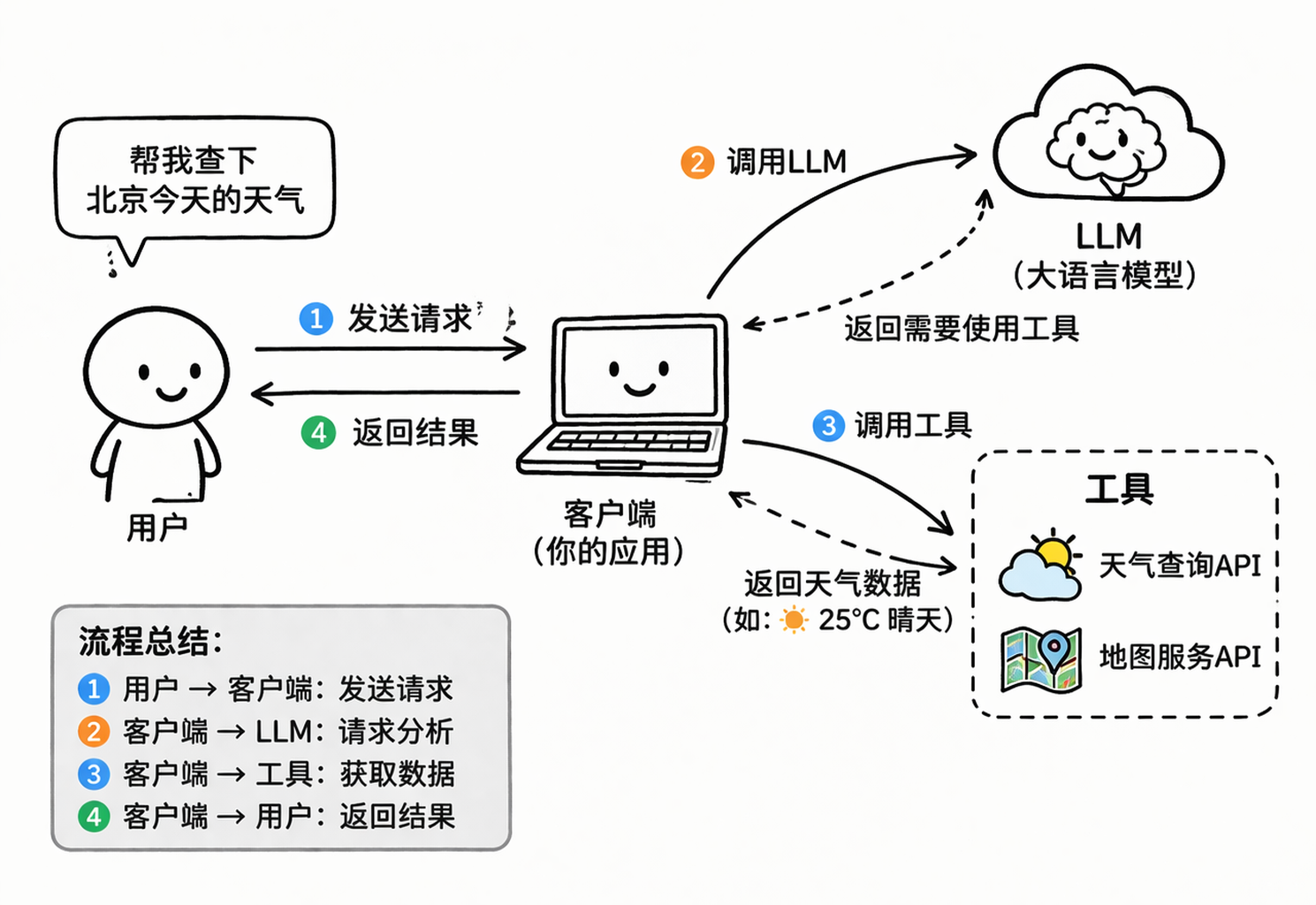
也就是说,RAG是让客户端来进行检索。实际上,也不是客户端进行检索,而是客户端调用工具进行检索。那么,既然客户端可以调用工具进行检索,自然也可以调用工具进行地图查询、天气查询、联网搜索,等等。
那么,问题来了,不同的工具需要不同的输入参数,返回不同的结果,例如:天气查询返回文本数据,地图服务返回二进制数据。难道要客户端对每个工具都进行适配吗?各种工具,如此繁杂,太不现实了。难道要每个工具都对客户端进行适配吗?先不说客户端开发商有没有那么大的号召力,就说客户端也不止一家啊,适配了这家客户端,那别家客户端怎么办,也不现实。
据说有一句名言,忘了是谁说的了,大概意思是:所有计算机问题,都可以通过加一层中间层来解决。
说了那么多,MCP就是这个中间层。
MCP是一个协议,实现了MCP协议的服务,承诺接收固定格式的参数,返回固定格式的结果。
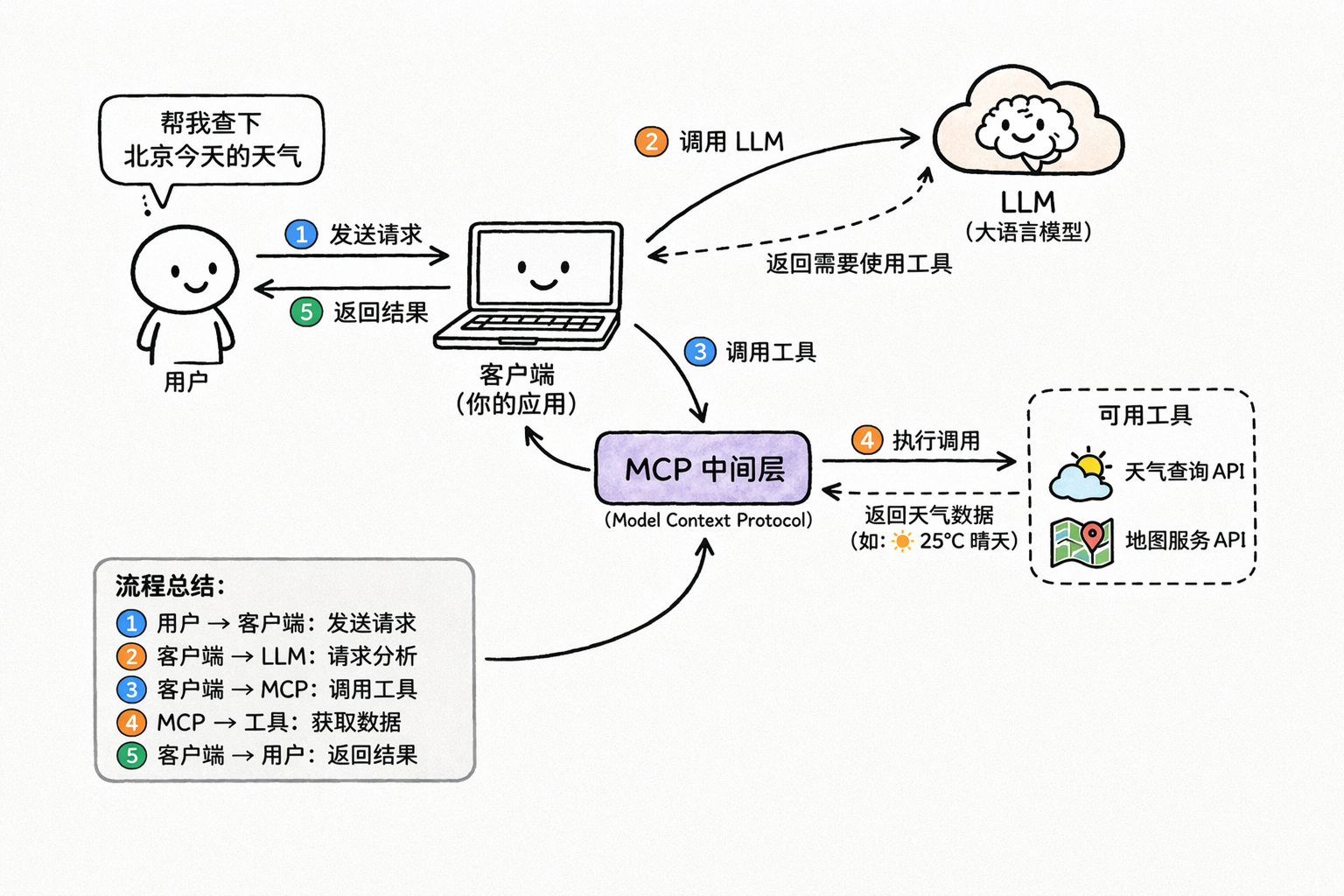
也就是说,现在客户端也不直接调用工具了,而是通过MCP服务来调用工具。
最后,贴一段MCP官方的定义:MCP (Model Context Protocol) is an open-source standard for connecting AI applications to external systems.(MCP(模型上下文协议)是一种用于将 AI 应用程序连接到外部系统的开源标准。)
接下来,我们边做边学,在实操中,我会解释涉及到的概念。
后续操作主要使用Codex Desktop,和Java。若是技术栈不符,只看其中的概念,也是通用的。
本地MCP服务
在这一部分,我们会在本地实现一个可供Codex使用的本地文件MCP服务。
安装Node.js
创建一个SpringBoot项目:McpDemo:
引入pom依赖:
1
2
3
4
5
6
7
8
9
10
11
12
13
14
15
16
17
18
19
20
21
22
23
24
25
26
27
28
29
30
31
32
33
34
35
36
37
38
39
40
41
42
43
44
45
46
47
48
49
50
51
52
53
54
55
56
57
58
59
60
61
62
63
64
65
66
67
<?xml version="1.0" encoding="UTF-8"?>
<project xmlns="http://maven.apache.org/POM/4.0.0" xmlns:xsi="http://www.w3.org/2001/XMLSchema-instance"
xsi:schemaLocation="http://maven.apache.org/POM/4.0.0 https://maven.apache.org/xsd/maven-4.0.0.xsd">
<modelVersion>4.0.0</modelVersion>
<parent>
<groupId>org.springframework.boot</groupId>
<artifactId>spring-boot-starter-parent</artifactId>
<version>4.0.4</version>
<relativePath/> <!-- lookup parent from repository -->
</parent>
<groupId>com.example</groupId>
<artifactId>McpDemo</artifactId>
<version>0.0.1-SNAPSHOT</version>
<name>McpDemo</name>
<description>McpDemo</description>
<url/>
<licenses>
<license/>
</licenses>
<developers>
<developer/>
</developers>
<scm>
<connection/>
<developerConnection/>
<tag/>
<url/>
</scm>
<properties>
<java.version>17</java.version>
<spring-ai.version>2.0.0-M3</spring-ai.version>
</properties>
<dependencies>
<dependency>
<groupId>org.springframework.ai</groupId>
<artifactId>spring-ai-starter-mcp-server</artifactId>
</dependency>
<dependency>
<groupId>org.springframework.boot</groupId>
<artifactId>spring-boot-starter-test</artifactId>
<scope>test</scope>
</dependency>
</dependencies>
<dependencyManagement>
<dependencies>
<dependency>
<groupId>org.springframework.ai</groupId>
<artifactId>spring-ai-bom</artifactId>
<version>${spring-ai.version}</version>
<type>pom</type>
<scope>import</scope>
</dependency>
</dependencies>
</dependencyManagement>
<build>
<plugins>
<plugin>
<groupId>org.springframework.boot</groupId>
<artifactId>spring-boot-maven-plugin</artifactId>
</plugin>
</plugins>
</build>
</project>配置application.yaml依赖:
1
2
3
4
5
6
7
8
9
10
11
12
13
14
15
16
17
18
19
20
21
22
23
spring:
application:
name: McpDemo
main:
banner-mode: off # 关闭 Spring 启动时输出的 banner,避免破坏 STDIO MCP
web-application-type: none # 不启用 Web容器
ai:
mcp:
server:
name: local-file-server # MCP服务名称
version: 1.0.0 # 版本
stdio: true # 低于 STDIO 的 MCP服务
type: SYNC # 同步模式,客户端会阻塞等待服务器的返回
instructions: | # MCP 服务的描述
This server can list files, read text files, and search text in files
under the configured base directory only.
annotation-scanner:
enabled: true # 启动时自动扫描项目中带 MCP 注解的 Bean 并注册为 MCP 工具,不需要手动注册每个工具
logging:
pattern:
console: # 不在控制台输出日志
file:
name: ./log/application.log # 将日志输出到文件中,默认是 stdio,但stdio要被mcp占用,如果我们用了stdio就会让mcp异常MCP支持基于STDIO和Streamable HTTP的服务:
- STDIO:作为本地进程运行的服务器(由命令启动)
- Streamable HTTP:可以访问的远程服务
编写处理本地文件的代码:
1
2
3
4
5
6
7
8
9
10
11
12
13
14
15
16
17
18
19
20
21
22
23
24
25
26
27
28
29
30
31
32
33
34
35
36
37
38
39
40
41
42
43
44
45
46
47
48
49
50
51
52
53
54
55
56
57
58
59
60
61
62
63
64
65
66
67
68
69
70
71
72
73
74
75
76
77
78
79
80
81
82
83
84
85
86
87
88
89
90
91
92
93
94
95
96
97
98
99
100
101
102
103
104
105
106
107
108
109
110
111
112
113
114
115
116
117
118
119
120
121
122
123
124
125
126
127
128
129
130
131
132
133
134
135
136
137
138
139
140
141
142
143
144
145
146
147
148
149
150
151
152
153
154
155
156
157
158
159
160
161
162
163
164
165
166
167
168
169
170
171
172
173
174
175
176
177
178
179
180
181
182
183
184
185
186
187
188
189
190
191
192
193
194
195
196
197
198
199
200
package com.example;
import org.springframework.ai.mcp.annotation.McpTool;
import org.springframework.ai.mcp.annotation.McpToolParam;
import org.springframework.stereotype.Component;
import java.io.IOException;
import java.nio.charset.MalformedInputException;
import java.nio.charset.StandardCharsets;
import java.nio.file.Files;
import java.nio.file.Path;
import java.nio.file.Paths;
import java.util.*;
import java.util.stream.Stream;
@Component
public class LocalFileTools {
// 最大单文件读取大小:1MB
private static final long MAX_FILE_SIZE = 1024 * 1024L;
// 允许读取的文本文件类型
private static final Set<String> ALLOWED_EXTENSIONS = Set.of(
".txt", ".md", ".java", ".xml", ".yml", ".yaml", ".json",
".properties", ".js", ".ts", ".html", ".css", ".sql",
".sh", ".bat", ".ps1", ".log", ".csv"
);
@McpTool(name = "get_base_dir", description = "返回当前 MCP 服务允许访问的根目录")
public String getBaseDir() {
return getBaseDirPath().toString();
}
@McpTool(name = "list_files", description = "列出指定目录下的文件")
public String listFiles(
@McpToolParam(description = "相对根目录的子目录", required = false) String relativeDir,
@McpToolParam(description = "是否递归列出", required = false) Boolean recursive,
@McpToolParam(description = "最多返回多少条", required = false) Integer maxResults
) throws IOException {
String dirArg = isBlank(relativeDir) ? "." : relativeDir;
boolean recursiveFlag = recursive == null || recursive;
int limit = maxResults == null ? 200 : Math.max(1, maxResults);
Path dir = safeResolve(dirArg);
if (!Files.exists(dir)) {
return "目录不存在: " + dirArg;
}
if (!Files.isDirectory(dir)) {
return "不是目录: " + dirArg;
}
List<String> files;
try (Stream<Path> stream = recursiveFlag ? Files.walk(dir) : Files.list(dir)) {
files = stream
.filter(Files::isRegularFile)
.map(this::toRelativePath)
.sorted()
.limit(limit)
.toList();
}
return files.isEmpty() ? "未找到文件" : String.join("\n", files);
}
@McpTool(name = "read_file", description = "读取单个文本文件的指定行范围")
public String readFile(
@McpToolParam(description = "相对根目录的文件路径") String relativePath,
@McpToolParam(description = "起始行号,从1开始", required = false) Integer startLine,
@McpToolParam(description = "结束行号", required = false) Integer endLine
) throws IOException {
if (isBlank(relativePath)) {
return "relativePath 不能为空";
}
int start = startLine == null ? 1 : Math.max(1, startLine);
int end = endLine == null ? 200 : Math.max(start, endLine);
Path file = safeResolve(relativePath);
if (!Files.exists(file)) {
return "文件不存在: " + relativePath;
}
if (!Files.isRegularFile(file)) {
return "不是文件: " + relativePath;
}
if (!isAllowedTextFile(file)) {
return "不允许读取该类型文件: " + file.getFileName();
}
if (Files.size(file) > MAX_FILE_SIZE) {
return "文件过大,拒绝读取";
}
List<String> lines;
try {
lines = Files.readAllLines(file, StandardCharsets.UTF_8);
} catch (MalformedInputException e) {
return "文件不是 UTF-8 文本,暂不支持读取";
}
int actualEnd = Math.min(end, lines.size());
StringBuilder sb = new StringBuilder();
sb.append("# File: ").append(relativePath).append("\n");
sb.append("# Lines: ").append(start).append("-").append(actualEnd).append("\n\n");
for (int i = start; i <= actualEnd; i++) {
sb.append(i).append(": ").append(lines.get(i - 1)).append("\n");
}
return sb.toString();
}
@McpTool(name = "search_in_files", description = "在目录内搜索关键词,返回 文件路径:行号:内容")
public String searchInFiles(
@McpToolParam(description = "要搜索的关键词") String keyword,
@McpToolParam(description = "相对根目录的子目录", required = false) String relativeDir,
@McpToolParam(description = "是否区分大小写", required = false) Boolean caseSensitive,
@McpToolParam(description = "最多返回多少条命中", required = false) Integer maxHits
) throws IOException {
if (isBlank(keyword)) {
return "keyword 不能为空";
}
String dirArg = isBlank(relativeDir) ? "." : relativeDir;
boolean caseFlag = caseSensitive != null && caseSensitive;
int limit = maxHits == null ? 100 : Math.max(1, maxHits);
Path dir = safeResolve(dirArg);
if (!Files.exists(dir) || !Files.isDirectory(dir)) {
return "目录不存在或非法: " + dirArg;
}
String needle = caseFlag ? keyword : keyword.toLowerCase(Locale.ROOT);
List<String> hits = new ArrayList<>();
try (Stream<Path> stream = Files.walk(dir)) {
Iterator<Path> iterator = stream
.filter(Files::isRegularFile)
.filter(this::isAllowedTextFile)
.iterator();
while (iterator.hasNext() && hits.size() < limit) {
Path file = iterator.next();
if (Files.size(file) > MAX_FILE_SIZE) {
continue;
}
List<String> lines;
try {
lines = Files.readAllLines(file, StandardCharsets.UTF_8);
} catch (MalformedInputException e) {
continue;
}
for (int i = 0; i < lines.size() && hits.size() < limit; i++) {
String line = lines.get(i);
String haystack = caseFlag ? line : line.toLowerCase(Locale.ROOT);
if (haystack.contains(needle)) {
hits.add(toRelativePath(file) + ":" + (i + 1) + ": " + line.trim());
}
}
}
}
return hits.isEmpty() ? "未找到匹配内容" : String.join("\n", hits);
}
private Path getBaseDirPath() {
String baseDir = System.getenv("LOCAL_FILE_MCP_BASE_DIR");
if (isBlank(baseDir)) {
baseDir = ".";
}
return Paths.get(baseDir).toAbsolutePath().normalize();
}
private Path safeResolve(String userPath) {
Path baseDir = getBaseDirPath();
Path resolved = baseDir.resolve(userPath).normalize().toAbsolutePath();
if (!resolved.startsWith(baseDir)) {
throw new IllegalArgumentException("禁止访问根目录之外的路径: " + userPath);
}
return resolved;
}
private boolean isAllowedTextFile(Path path) {
String fileName = path.getFileName().toString().toLowerCase(Locale.ROOT);
return ALLOWED_EXTENSIONS.stream().anyMatch(fileName::endsWith);
}
private String toRelativePath(Path path) {
return getBaseDirPath().relativize(path.toAbsolutePath().normalize())
.toString()
.replace("\\", "/");
}
private boolean isBlank(String s) {
return s == null || s.isBlank();
}
}编写一个客户端测试一下:
1
2
3
4
5
6
7
8
9
10
11
12
13
14
15
16
17
18
19
20
21
22
23
24
25
26
27
28
29
30
31
32
33
package com.example;
import io.modelcontextprotocol.client.McpClient;
import io.modelcontextprotocol.client.transport.ServerParameters;
import io.modelcontextprotocol.client.transport.StdioClientTransport;
import io.modelcontextprotocol.json.McpJsonDefaults;
import io.modelcontextprotocol.spec.McpSchema.ListToolsResult;
import org.slf4j.Logger;
import org.slf4j.LoggerFactory;
public class ClientStdio {
private static final Logger log = LoggerFactory.getLogger(ClientStdio.class);
public static void main(String[] args) {
var stdioParams = ServerParameters.builder("java")
.args("-jar",
"D:\\IdeaProjects\\McpDemo\\target\\McpDemo-0.0.1-SNAPSHOT.jar")
.build();
var transport = new StdioClientTransport(stdioParams, McpJsonDefaults.getMapper());
var client = McpClient.sync(transport).build();
client.initialize();
// List and demonstrate tools
ListToolsResult toolsList = client.listTools();
log.info("Available Tools = " + toolsList);
client.closeGracefully();
}
}通过maven将项目进行package,获得文件McpDemo-0.0.1-SNAPSHOT.jar
运行ClientStdio客户端,可以看到在控制台打印出了工具列表:
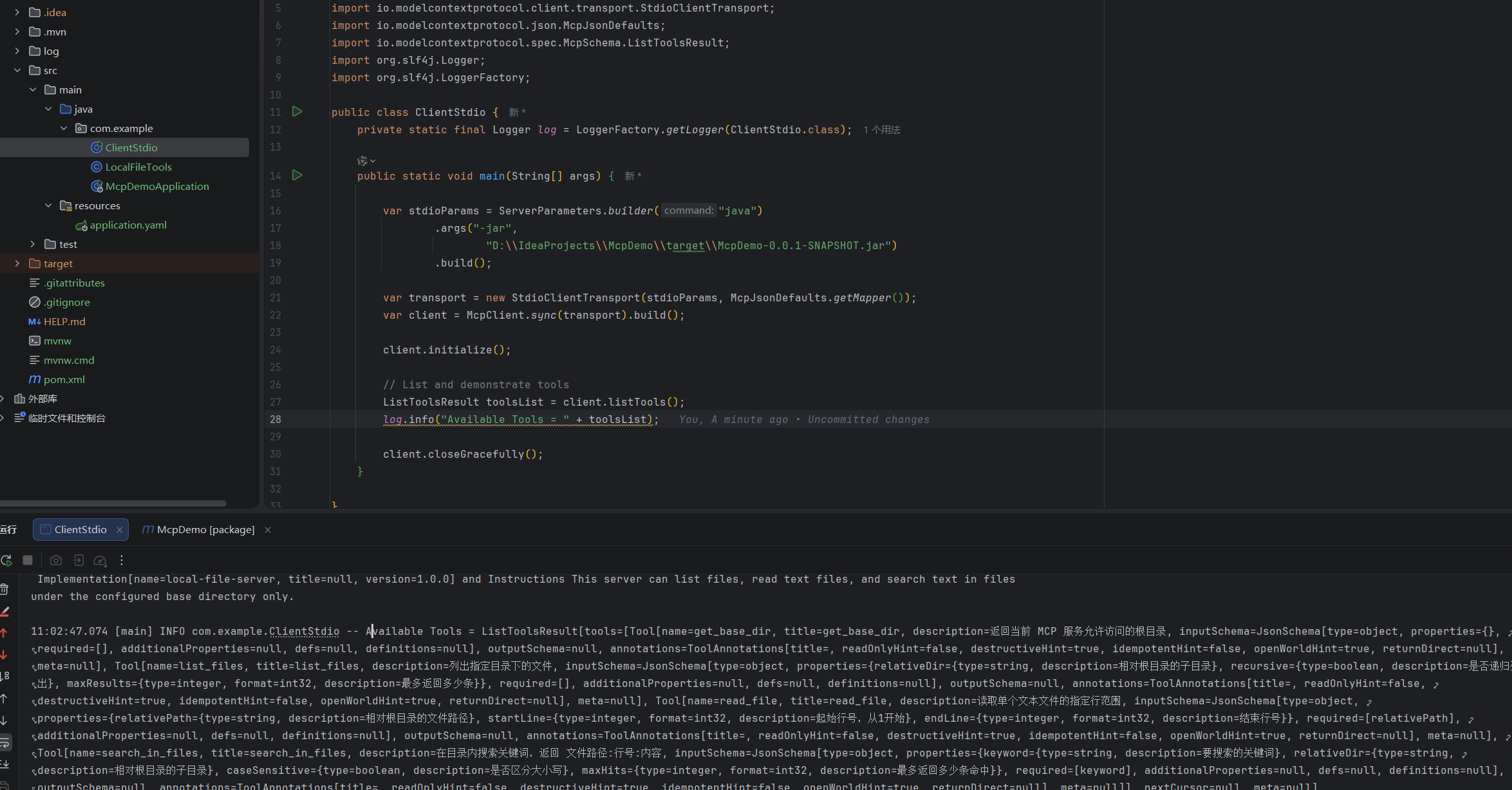
在Codex Desktop的 设置->MCP服务器 中添加服务器:
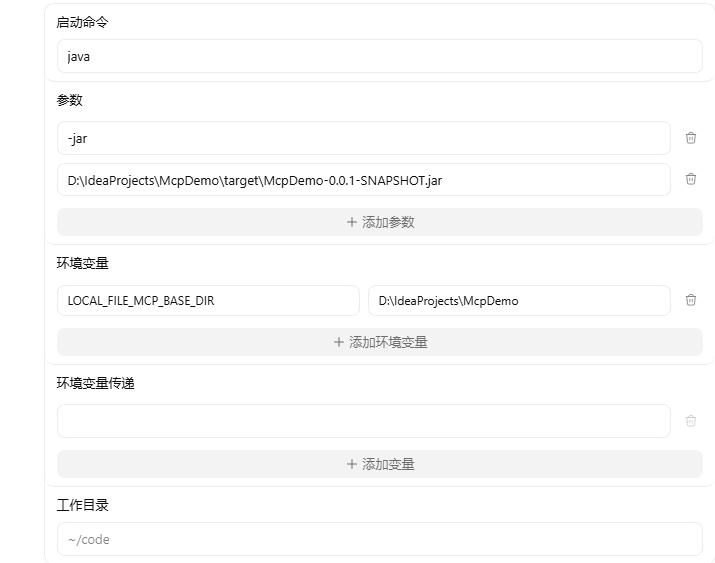
对于Codex基于STDIO的MCP,有以下几个主要参数可以配置:
- command:启动命令,必填,是启动MCP服务器的命令
- args:参数,可选,是启动命令的参数
- env:环境变灵,可选,用于配置MCP服务器需要的环境变量
- env_vars:环境变量传递,可选,将系统中的环境变量传递给MCP服务
- cwd:工作目录,可选,限制MCP服务在该目录下工作
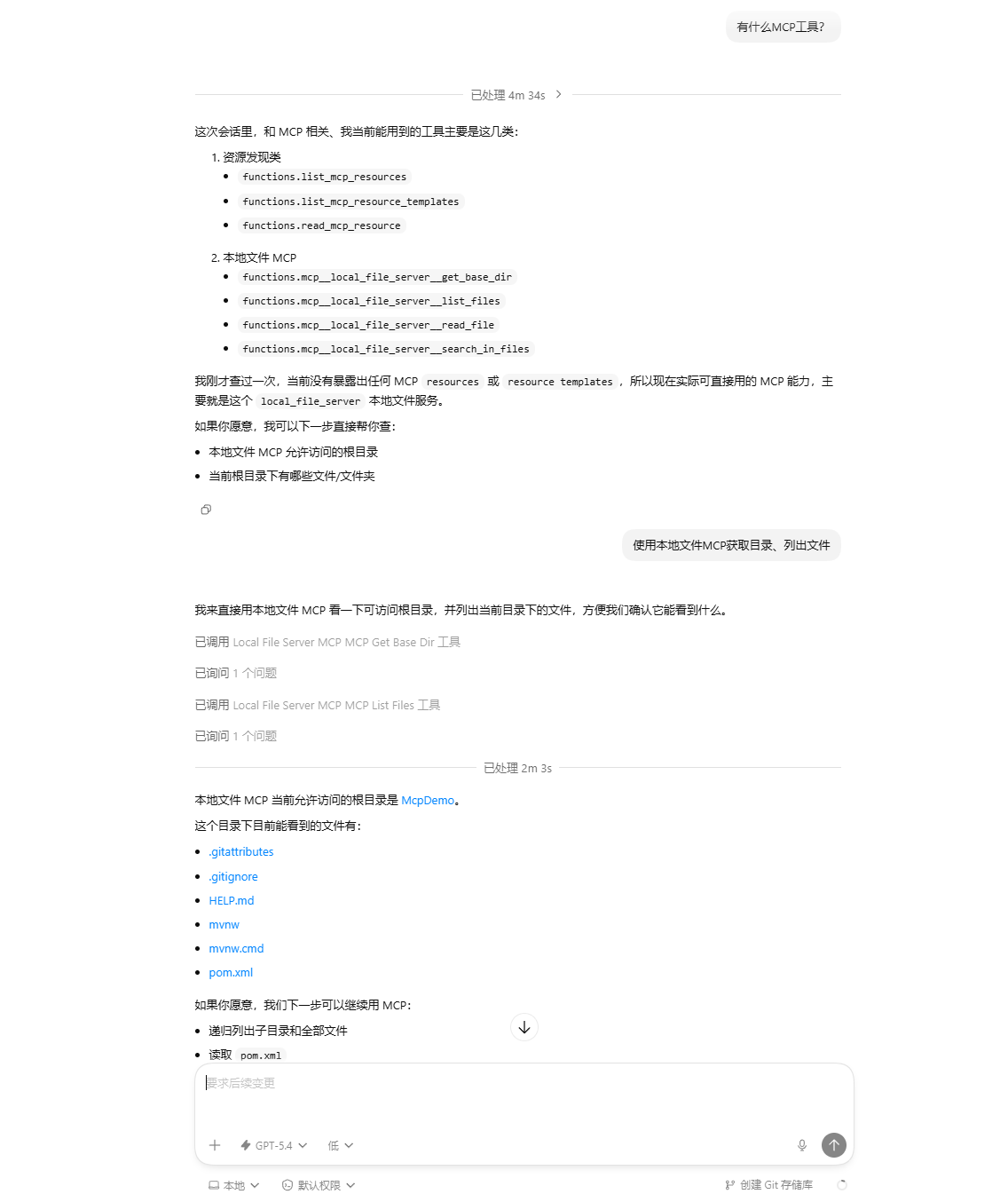
在Codex中测试:
远程MCP服务
在这一部分,我们会实现一个可供Codex远程调用的MCP服务。
创建一个SpringBoot项目:McpDemo:
引入pom依赖:
1
2
3
4
5
6
7
8
9
10
11
12
13
14
15
16
17
18
19
20
21
22
23
24
25
26
27
28
29
30
31
32
33
34
35
36
37
38
39
40
41
42
43
44
45
46
47
48
49
50
51
52
53
54
55
56
57
58
59
60
61
62
63
64
65
66
67
<?xml version="1.0" encoding="UTF-8"?>
<project xmlns="http://maven.apache.org/POM/4.0.0" xmlns:xsi="http://www.w3.org/2001/XMLSchema-instance"
xsi:schemaLocation="http://maven.apache.org/POM/4.0.0 https://maven.apache.org/xsd/maven-4.0.0.xsd">
<modelVersion>4.0.0</modelVersion>
<parent>
<groupId>org.springframework.boot</groupId>
<artifactId>spring-boot-starter-parent</artifactId>
<version>4.0.4</version>
<relativePath/> <!-- lookup parent from repository -->
</parent>
<groupId>com.example</groupId>
<artifactId>McpDemo</artifactId>
<version>0.0.1-SNAPSHOT</version>
<name>McpDemo</name>
<description>McpDemo</description>
<url/>
<licenses>
<license/>
</licenses>
<developers>
<developer/>
</developers>
<scm>
<connection/>
<developerConnection/>
<tag/>
<url/>
</scm>
<properties>
<java.version>17</java.version>
<spring-ai.version>2.0.0-M3</spring-ai.version>
</properties>
<dependencies>
<dependency>
<groupId>org.springframework.ai</groupId>
<artifactId>spring-ai-starter-mcp-server-webmvc</artifactId>
</dependency>
<dependency>
<groupId>org.springframework.boot</groupId>
<artifactId>spring-boot-starter-test</artifactId>
<scope>test</scope>
</dependency>
</dependencies>
<dependencyManagement>
<dependencies>
<dependency>
<groupId>org.springframework.ai</groupId>
<artifactId>spring-ai-bom</artifactId>
<version>${spring-ai.version}</version>
<type>pom</type>
<scope>import</scope>
</dependency>
</dependencies>
</dependencyManagement>
<build>
<plugins>
<plugin>
<groupId>org.springframework.boot</groupId>
<artifactId>spring-boot-maven-plugin</artifactId>
</plugin>
</plugins>
</build>
</project>编写application.yml配置文件:
1
2
3
4
5
6
7
8
9
10
11
12
13
14
15
server:
port: 8080
spring:
application:
name: McpDemo
ai:
mcp:
server:
name: remote-mcp-server # MCP服务名称
version: 1.0.0 # 版本
type: SYNC # 同步模式,客户端会阻塞等待服务器的返回
instructions: 这是一个可以和你打招呼的远程MCP服务。 # MCP 服务的描述
annotation-scanner:
enabled: true # 启动时自动扫描项目中带 MCP 注解的 Bean 并注册为 MCP 工具,不需要手动注册每个工具
protocol: streamable # 基于 Streamable 的 MCP服务编写要提供的工具:
1
2
3
4
5
6
7
8
9
10
11
12
13
14
15
16
17
18
19
20
21
package com.example;
import org.springframework.ai.mcp.annotation.McpTool;
import org.springframework.ai.mcp.annotation.McpToolParam;
import org.springframework.stereotype.Component;
@Component
public class McpTools {
@McpTool(name = "ping", description = "检查远程 MCP 服务是否可用")
public String ping() {
return "pong";
}
@McpTool(name = "hello", description = "打个招呼")
public String hello(
@McpToolParam(description = "你的名字") String name
) {
return "你好 " + name + ",我是 远程MCP服务。";
}
}启动这个项目
在Codex Desktop中配置MCP:
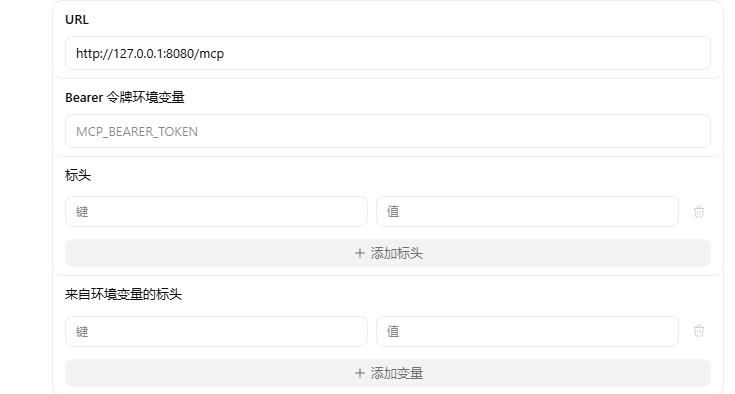
对于Codex基于Streamable HTTP的MCP,有以下几个主要参数可以配置:
- url:必填,MCP服务器的地址
- bearer_token_env_var:Bearer令牌环境变量,可选,用于MCP服务认证授权的Token
- http_headers:表头,可选,添加在http请求头里的键值对
- env_http_headers:来自环境变量的标头,可选,添加在http请求头里的环境变量键值对
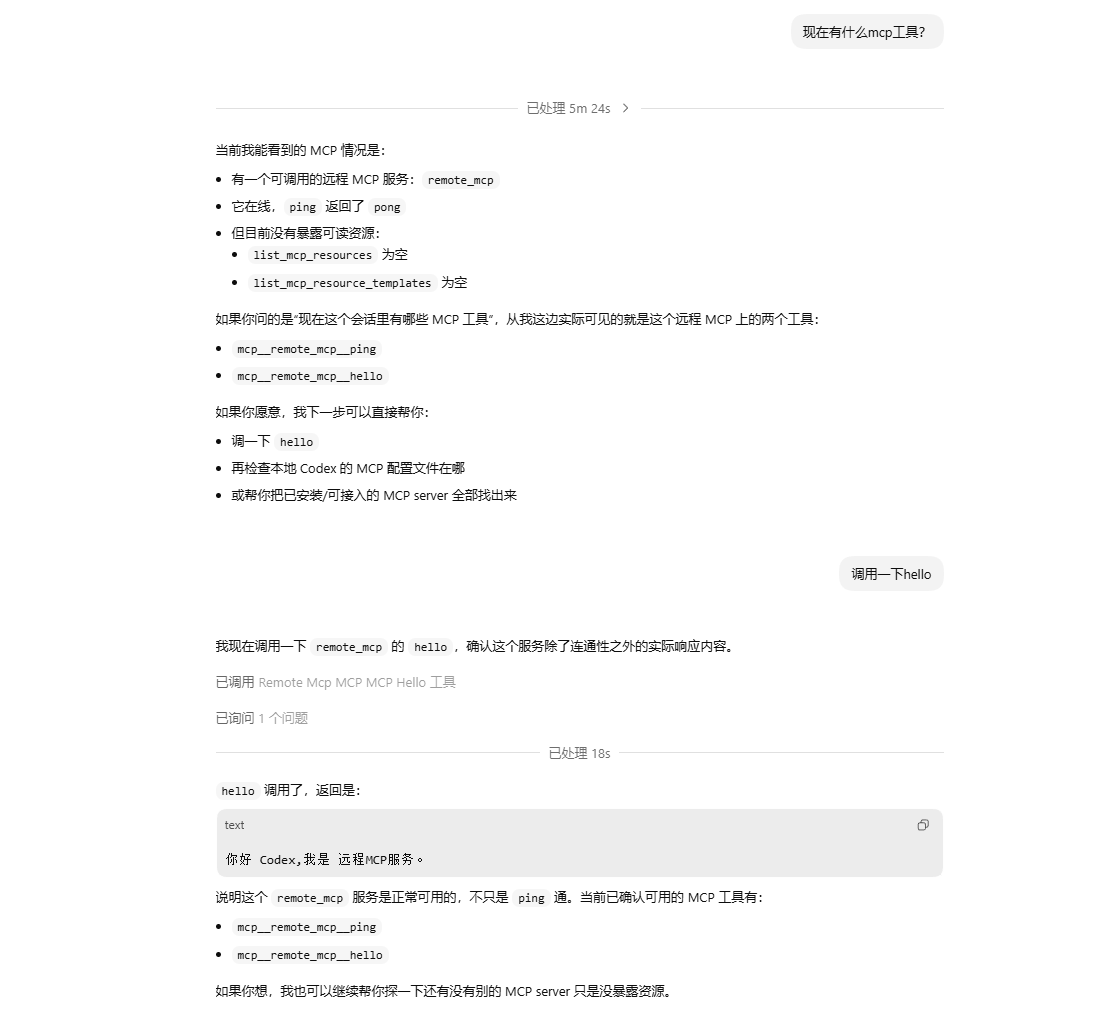
在Codex中测试: