CORS-跨域资源共享

什么是CORS ?

在前后端分离的项目中,我们往往会遇到跨域问题。

跨域问题只会出现在浏览器发起AJAX(XMLHttpRequest、Fetch)请求的时候,因为浏览器限制了AJAX只能从同一个源请求资源,除非配置了正确的CORS。

CORS被翻译为跨域资源共享(或者跨源资源共享),是一种基于HTTP头的机制,该机制允许服务器标识除自己以外的,使得浏览器允许这些源访问自己的资源。

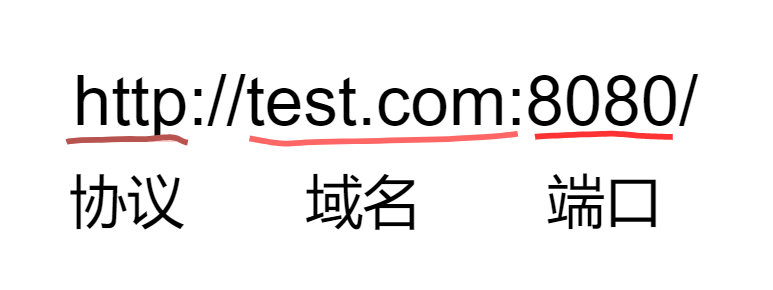
源就是指请求URL中的协议、域名、端口号

当请求发起者与接收者的协议、域名、端口号三者有任一个不同时即为跨域(跨源),就发生了CORS。

请求发起者 请求接受者 是否跨域 原因
http://www.test.com/ http://www.test.com/index.html 同源
http://www.test.com/ https://www.test.com/ 协议不同(http、https)
http://www.test.com:8080/ http://www.test.com:8088/ 端口不同(8080、8088)
http://www.test.com/ http://www.tesT.com/ 同源
http://www.a.com/ http://www.b.com/ 域名不同(a、b)

CORS 又分为简单请求和非简单请求

简单请求

在HTML中一般可以通过

元素发起简单请求。

简单请求需满足以下条件:

  • 使用以下请求方法之一:
    • HEAD
    • POST
    • GET
  • 除自动配置的标头字段外,仅可人为配置以下字段:
    • Accept
    • Accept-Language
    • Content-Language
    • Content-Type
    • Range
  • Content-Type设置的媒体类型仅限以下类型:
    • text/plain
    • multipart/form-data
    • application/x-www-form-urlencoded
  • 如果请求是使用XMLHttpRequest对象发出的,在返回的XMLHttpRequest.upload对象属性上没有注册任何事件监听器
  • 请求中没有使用ReadableStream对象

非简单请求

非简单请求需要在发送实际请求之前使用OPTIONS方法发送一个预检请求,以获知服务器是否允许该实际请求,避免实际的跨域请求对用户数据产生影响。

Nginx解决跨域问题

使用Nginx反向代理解决跨域问题是较为简单的解决办法,只需要配置nginx.conf配置文件即可:

1
2
3
4
5
6
7
8
9
10
11
12
13
14
15
16
17
18
19
20
21
22
23
24
25
26
27
28
server {
#nginx监听所有localhost:8080端口收到的请求
listen 8080;
server_name localhost;

# Load configuration files for the default server block.
include /etc/nginx/default.d/*.conf;

#localhost:8080 会被转发到这里
#同时, 后端程序会接收到 "192.168.25.20:8088"这样的请求url
location / {
proxy_pass http://192.168.25.20:8088;
}

#localhost:8080/api/ 会被转发到这里
#同时, 后端程序会接收到 "192.168.25.20:9000/api/"这样的请求url
location /api/ {
proxy_pass http://192.168.25.20:9000;
}

error_page 404 /404.html;
location = /40x.html {
}

error_page 500 502 503 504 /50x.html;
location = /50x.html {
}
}

Spring 解决跨域问题

WebMvcConfigurer

可以通过重写WebMvcConfigurer中的***addCorsMappings(CorsRegistry registry)***方法来配置全局跨域设置:

1
2
3
4
5
6
7
8
9
10
11
12
13
14
15
16
17
18
import org.springframework.context.annotation.Configuration;
import org.springframework.web.servlet.config.annotation.CorsRegistry;
import org.springframework.web.servlet.config.annotation.WebMvcConfigurer;

@Configuration
public class WebMvcConfiguration implements WebMvcConfigurer{
@Override
public void addCorsMappings(CorsRegistry registry) {
registry.addMapping("/**") // 允许跨域请求的path,支持路径通配符,如:/api/**
.allowedOrigins("*") // 允许发起请求的源
.allowedHeaders("*") // 允许客户端的提交的 Header,通配符 * 可能有浏览器兼容问题
.allowedMethods("GET") // 允许客户端使用的请求方法
.allowCredentials(false) // 不允许携带凭证
.exposedHeaders("X-Auth-Token, X-Foo") // 允许额外访问的 Response Header
.maxAge(3600) // 预检缓存一个小时
;
}
}

@CrossOrigin

为了更精确的配置跨域,可以在Controller类或其方法上添加注解***@CrossOrigin***

1
2
3
4
5
6
7
8
9
10
11
12
13
14
15
16
17
18
import org.springframework.web.bind.annotation.CrossOrigin;
import org.springframework.web.bind.annotation.RequestMapping;
import org.springframework.web.bind.annotation.RequestMethod;
import org.springframework.web.bind.annotation.RestController;

@RequestMapping("/foo")
@RestController
@CrossOrigin(
origins = "*", // 允许的源,也就是 allowedOrigins
allowCredentials = "false", // 不允许提交cookie
allowedHeaders = "*", // 允许的请求头
exposedHeaders = "*", // 允许客户端额外读取的响应头
maxAge = 3600, // 缓存时间
methods = {RequestMethod.GET, RequestMethod.HEAD} // 允许客户端的请求方法
)
public class FooController {

}

CorsFilter

不管是WebMvcConfigurer还是**@CrossOrigin**都是硬编码的方式,不够灵活。

Spring提供了一个CorsFilter让我们以编程式的方式更灵活的配置跨域。

1
2
3
4
5
6
7
8
9
10
11
12
13
14
15
16
17
18
19
20
21
22
23
24
25
26
27
28
29
30
31
32
33
34
35
36
37
38
39
40
41
42
43
44
45
46
47
48
49
50
51
52
53
54
55
56
57
58
59
60
import java.time.Duration;

import org.springframework.boot.web.servlet.FilterRegistrationBean;
import org.springframework.context.annotation.Bean;
import org.springframework.context.annotation.Configuration;
import org.springframework.core.Ordered;
import org.springframework.http.HttpHeaders;
import org.springframework.util.StringUtils;
import org.springframework.web.cors.CorsConfiguration;
import org.springframework.web.filter.CorsFilter;
import org.springframework.web.servlet.config.annotation.WebMvcConfigurer;

@Configuration
public class WebMvcConfiguration implements WebMvcConfigurer{

// 通过 FilterRegistrationBean 注册 CorsFilter
@Bean
public FilterRegistrationBean<CorsFilter> corsFilter() {

// 跨域 Filter
CorsFilter corsFilter = new CorsFilter(request -> {

// 请求源
String origin = request.getHeader(HttpHeaders.ORIGIN);

if (!StringUtils.hasText(origin)) {
return null; // 非跨域请求
}

// 针对每个请求,编程式设置跨域
CorsConfiguration config = new CorsConfiguration();

// 允许发起跨域请求的源,直接取 Origin header 值,不论源是哪儿,服务器都接受
config.addAllowedOrigin(origin);


// 允许客户端的请求的所有 Header
String headers = request.getHeader(HttpHeaders.ACCESS_CONTROL_REQUEST_HEADERS);
if (StringUtils.hasText(headers)) {
config.setAllowedHeaders(Stream.of(headers.split(",")).map(String::trim).distinct().toList());
}

// 允许客户端的所有请求方法
config.addAllowedMethod(request.getHeader(HttpHeaders.ACCESS_CONTROL_REQUEST_METHOD));
// 允许读取所有 Header
// 注意,"*" 通配符,可能在其他低版本浏览中不兼容。
config.addExposedHeader("*");
// 缓存30分钟
config.setMaxAge(Duration.ofMinutes(30));
// 允许携带凭证
config.setAllowCredentials(true);
return config;
});

FilterRegistrationBean<CorsFilter> bean = new FilterRegistrationBean<>(corsFilter);
bean.addUrlPatterns("/*"); // Filter 拦截路径
bean.setOrder(Ordered.LOWEST_PRECEDENCE); // 保证最先执行
return bean;
}
}

不管是什么方式,当allowCredentials为true允许携带凭证时,allowedOrigins不能再使用通配符“*”,必须填写确切的源。

凭证通常是包含用户标识的Cookie


CORS-跨域资源共享
https://www.wananhome.site/2024/07/25/CORS-跨域资源共享/
作者
WanAn
发布于
2024年7月25日
许可协议